Article
What MCP Is and Why Backend Engineers Should Care
A practical explanation of MCP through the lens of APIs, integrations, tool access, and backend engineering habits.
MCP, or Model Context Protocol, is a standard way for AI applications to connect to tools, data, and systems outside the model. For backend engineers, the simple version is this: MCP gives AI agents a more consistent interface for calling real software capabilities, instead of every app inventing a custom integration layer from scratch.
That matters because most useful AI systems are not useful only because the model can generate text. They are useful because the model can inspect context, call tools, retrieve data, and help move work through existing systems.
Backend engineers already understand this world. We spend our time designing APIs, permissions, queues, service boundaries, failure handling, logs, and integration contracts. MCP sits close to that same mental model.
It is not magic. It is not a replacement for APIs. It is a protocol for making selected external capabilities available to AI applications in a structured way.
Why is MCP becoming important?
Large language models are strongest when they have the right context and the right tools.
A model on its own can answer from training data and the prompt you give it. That is useful, but limited. Real work usually depends on live information and real actions:
- Reading an issue from a project tracker
- Searching a codebase
- Looking up customer data
- Creating a ticket
- Checking deployment status
- Fetching documentation
- Running a controlled internal workflow
Before MCP, AI apps often had to build or adopt their own integration approach. One tool might connect to GitHub one way. Another might connect to a database another way. A third might expose a plugin system with its own schema and permission model.
MCP tries to reduce that fragmentation.
The practical value is not that MCP makes integration easy in every case. It does not. The value is that it gives AI applications and tool providers a shared shape for the conversation.
For a backend engineer, that should sound familiar. Standards do not remove complexity. They move the complexity into a place where teams can reason about it.
How should backend engineers think about MCP?
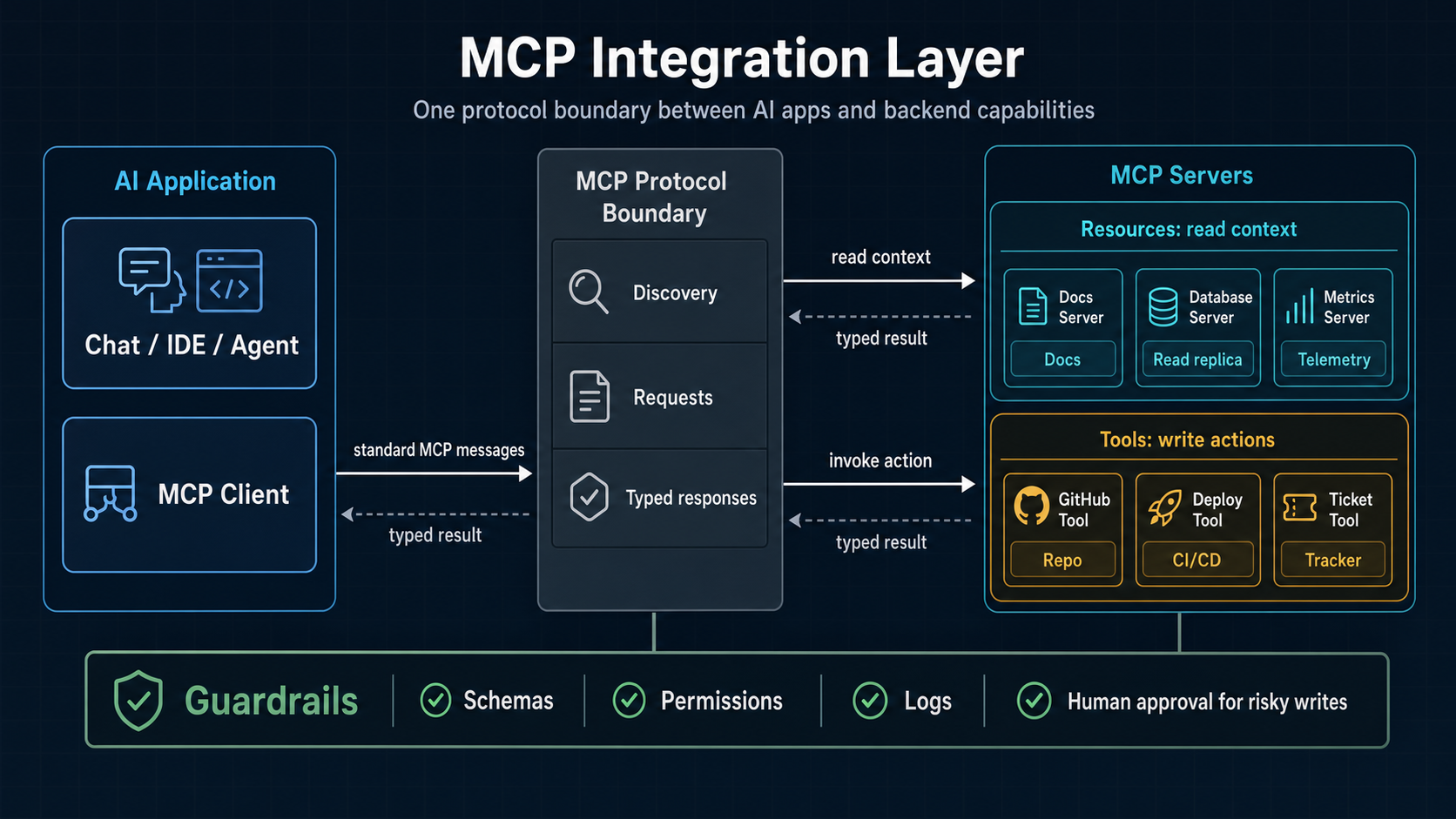
Backend engineers should think about MCP as an integration boundary for AI systems.
That boundary has three important jobs:
- It describes what capabilities are available.
- It gives the AI application a way to request those capabilities.
- It creates a place where access, safety, observability, and failure handling can be designed.
This is why MCP is more interesting than the surface-level phrase “AI tool use” suggests.
Tool use sounds like a model pressing buttons. Backend engineers should see something more concrete: a client asking a server for available capabilities, receiving structured descriptions, and making controlled calls into external systems.
The model may influence which tool is selected. The protocol defines how that tool is exposed.
That distinction matters.
If you are building production AI systems, you do not want a model vaguely “having access” to your systems. You want a controlled integration surface. You want clear inputs. You want predictable outputs. You want permissions. You want logs. You want to know what happened when something fails.
MCP gives you a vocabulary for that design conversation. It provides the integration surface where those controls can live, but the implementation still has to enforce safety, authorization, observability, and validation.
For more on the broader engineering mindset behind this, see What I Mean by Practical AI Engineering. MCP fits that same idea: useful AI work is software engineering work, not prompt decoration.
What are MCP clients, servers, tools, and resources?
MCP has a few core concepts that are worth separating early.
The protocol also includes prompts, which can provide reusable instruction templates for clients. This article focuses on the concepts backend engineers are most likely to touch directly when designing integrations: clients, servers, tools, and resources.
What is an MCP client?
An MCP client is the application that wants to use external context or capabilities through MCP.
In practice, this might be an AI coding assistant, an agent runtime, a desktop AI app, or an internal company tool. The client connects to one or more MCP servers and asks what they can provide.
The client is the side closer to the model and the user experience.
What is an MCP server?
An MCP server exposes capabilities to MCP clients.
A server might wrap a database, a project management system, a documentation store, a code search service, or an internal API. The server describes what it can do and handles requests from the client.
The server is the side closer to your systems.
This is the part backend engineers should pay attention to. MCP servers are where a lot of serious engineering decisions live: authentication, authorization, validation, rate limits, logging, retries, and safe access to internal services.
What is an MCP tool?
A tool is an action the MCP server exposes.
Examples might include:
create_issuesearch_docsget_customer_summarylist_open_pull_requestsrun_release_checklist
Tools usually have input schemas. That is important because it lets the client understand what information is required before a tool can be called.
A good MCP tool should feel like a well-designed API endpoint. It should be narrow enough to be safe, clear enough to be used correctly, and useful enough to justify its existence.
What is an MCP resource?
A resource is context that an MCP server makes available.
Resources are often read-oriented. They might represent files, documents, records, logs, or other information the AI application can inspect.
If tools are closer to actions, resources are closer to context.
That separation is useful. Reading information and taking action should not be treated as the same level of risk.
Is MCP just another API layer?
MCP is not a replacement for APIs.
It usually sits above or beside APIs. An MCP server often wraps existing APIs and presents them in a way that an AI client can discover and use.
That means backend engineers should not treat MCP as a reason to skip normal API design. If anything, MCP makes API design more important.
The underlying systems still need to be reliable. They still need permissions. They still need clear domain boundaries. They still need error handling. MCP does not erase those responsibilities.
A useful way to frame it is this:
APIs expose capabilities to software. MCP exposes selected capabilities to AI applications in a structured way.
That selected part is important.
You probably do not want to expose your entire internal API surface through MCP. You want to expose a carefully chosen set of capabilities that are safe, useful, and understandable.
Backend engineers already know how to make those tradeoffs. MCP just changes the consumer.
What does a practical MCP example look like?
Imagine a project management MCP server for an engineering team.
The company already uses a project tracker. It already has an API. Engineers already create tickets, update statuses, assign work, and link pull requests.
Now the team wants an internal AI assistant that can help with project management tasks.
Without MCP, the assistant might need a custom integration built directly into the AI app. That integration might work, but it is tightly coupled to one client.
With MCP, the team can build a project management MCP server that exposes a limited set of tools and resources.
Possible resources:
- Current sprint summary
- Open issues assigned to a user
- Issue details
- Project documentation
- Release checklist
Possible tools:
create_issueupdate_issue_statusassign_issueadd_comment_to_issuelink_pull_request
The AI assistant can then help with tasks like:
- “Create a bug ticket from this incident summary.”
- “Show me the open backend tasks for this sprint.”
- “Add a comment to the issue saying the migration is deployed to staging.”
- “Find issues related to the payment webhook work.”
The backend engineering work is not just writing a wrapper around an API.
The real work is deciding what the assistant should be allowed to do, what it should only be allowed to read, what needs human confirmation, what should be logged, and what failure states look like.
For example, creating an issue may be safe enough if the input is validated. Closing an issue may require confirmation. Deleting an issue should probably not be exposed at all.
That is the kind of judgment MCP needs.
What can go wrong with MCP?
The main risk with MCP is treating it as a convenience layer instead of a system boundary.
When an AI application can call tools, the failure modes change. A bad answer is one kind of problem. A bad action is another.
Backend engineers should think carefully about:
- Over-broad permissions
- Tools that do too much
- Weak input validation
- Missing audit logs
- Hidden side effects
- Poor error messages
- Unclear ownership of servers
- No review path for sensitive actions
- No rate limits or abuse controls
- Confusing read access with write access
The model should not be the only safety layer.
This is the same lesson backend engineers already apply elsewhere. You do not rely on a frontend form to protect a database. You do not rely on a user interface to enforce authorization. You do not rely on good intentions as an access-control model.
MCP should be designed with the same seriousness.
That does not mean every MCP server needs enterprise complexity on day one. It means the boundary should be explicit from the beginning.
How does MCP relate to AI agents?
MCP is not the same thing as an AI agent.
An AI agent is usually a system that can reason over a task, decide what steps to take, use tools, and continue across multiple actions or turns. MCP is one way to provide tools and context to that kind of system.
In other words, MCP can be part of an agent architecture, but it is not the agent itself.
That distinction helps avoid confusion.
If an agent is the worker, MCP is part of the tool access layer. It helps define what the worker can see and do.
I wrote more about the backend view of agents in How Backend Engineers Should Think About AI Agents. The short version is that agents become more understandable when you stop treating them as personalities and start treating them as software systems with state, tools, policies, and failure modes.
MCP fits neatly into that framing.
What makes a good MCP server?
A good MCP server is not the one that exposes the most tools.
A good MCP server exposes the right capabilities with the right constraints.
The best servers are usually boring in the way good backend systems are boring. They are predictable. They have clear names. They validate inputs. They return useful errors. They log important events. They do not surprise the systems around them.
A good MCP server should answer these questions clearly:
- What system does this server wrap?
- Who is allowed to use it?
- What tools does it expose?
- Which tools are read-only?
- Which tools can change state?
- Which actions require confirmation?
- What inputs are accepted?
- What happens when the underlying system is unavailable?
- What gets logged?
- Who owns maintenance?
If those answers are unclear, the protocol will not save you.
Protocols help systems communicate. They do not decide what the system should be allowed to do.
How should backend engineers evaluate MCP?
Use this checklist before building or adopting an MCP server.
1. Is the use case real?
Do not start with “we need MCP.” Start with the workflow.
What does the user need the AI system to do? What context does it need? What actions are genuinely useful? What should remain outside the AI system?
If the workflow is unclear, the server will become a pile of speculative tools.
2. Is the capability narrow enough?
Prefer small, specific tools over broad ones.
A tool like create_support_refund is easier to reason about than execute_sql. A tool like search_project_docs is safer than unrestricted file access.
Narrow tools make behavior easier to test, log, and review.
3. Are read and write actions separated?
Reading data and changing data should be treated differently.
A server that exposes project summaries is not the same risk as a server that can update project status. A server that can draft a ticket is not the same risk as one that can delete a ticket.
Separate these capabilities deliberately.
4. Is authorization handled outside the model?
The model should not decide whether the user is allowed to perform an action.
Authorization belongs in the system boundary. The MCP server or the services behind it should enforce what the user, client, or tool call is allowed to do.
If the model asks for an action the user cannot perform, the correct result is denial, not persuasion.
5. Are tool calls observable?
You should be able to answer what happened.
Which user asked for the action? Which client called the tool? What inputs were sent? What result came back? Did it change state? Did it fail?
Without observability, debugging becomes guesswork and trust becomes fragile.
6. Are errors designed for recovery?
Errors should help the AI application and the user recover.
A vague failure like “something went wrong” is not enough. The response should make clear whether the issue is validation, permissions, missing data, rate limiting, or an upstream outage.
Good errors reduce bad retries and confused follow-up actions.
7. Is there a human confirmation path?
Some actions should not happen without explicit approval.
This is especially true for destructive actions, external communication, financial movement, permission changes, or anything that affects customers.
MCP can expose capabilities. It should not remove judgment.
What should teams avoid when adopting MCP?
Avoid treating MCP as a way to give a model broad access to everything.
That is the wrong direction.
A better approach is to start with one workflow and one server. Choose a bounded problem. Expose a small number of resources and tools. Test the flow. Watch the logs. Learn where the model asks for ambiguous actions. Tighten the interface.
Also avoid copying internal API shapes directly into MCP tools.
Your internal API may be designed for services, not AI-assisted workflows. An MCP tool should represent a capability that makes sense in the context of the AI client. Sometimes that will map closely to an existing endpoint. Sometimes it should be a safer, narrower wrapper.
The goal is not to mirror everything. The goal is to expose the right thing.
Why should backend engineers care now?
Backend engineers should care because MCP moves AI work closer to the systems they already own.
The first wave of AI tooling often looked like prompt writing and chat interfaces. That made it seem separate from backend engineering.
The next wave is more about integration: models using tools, agents coordinating work, assistants reading live context, and AI systems calling real services.
That is backend territory.
The important questions are not only “which model should we use?” The important questions are also:
- What systems can the AI application access?
- What can it read?
- What can it change?
- How are tool calls authenticated?
- How are they authorized?
- How are they logged?
- How do we test the integration?
- What happens when something fails?
Those are engineering questions.
MCP gives backend engineers a concrete place to apply their existing skills to AI systems.
MCP is worth understanding because it gives backend engineers a practical way to think about AI integration.
It does not remove the hard parts of engineering. It makes them more visible.
That is a good thing.
If AI systems are going to read from tools, call APIs, update records, and participate in real workflows, they need boundaries that engineers can inspect and trust.
MCP is one of the places where those boundaries are starting to take shape.
Glossary
Terms used in this article
- MCP - Model Context Protocol
- A protocol for connecting AI applications to external tools, data, and systems in a structured way.
- MCP server
- A service that exposes tools and resources to MCP clients, usually by wrapping an existing system, API, database, documentation store, or internal service.
- MCP client
- An application that connects to MCP servers so it can access tools or context, usually from the side closer to the model and user interface.
- API - Application Programming Interface
- A contract that lets one software system request data or actions from another software system.
- LLM - Large Language Model
- A model trained on large amounts of text that can generate, transform, and reason over language-like inputs.
- AI - Artificial Intelligence
- Software techniques that make systems perform tasks that usually require human-like reasoning, language understanding, or decision support.
- Tool
- Actions exposed by an MCP server, usually with structured inputs and structured results.
- Resource
- Context exposed by an MCP server, often read-oriented information such as files, records, documents, logs, or summaries.
- Authentication
- The process of proving who a user, system, or client is.
- Authorization
- The process of deciding whether a user, system, or tool is allowed to perform a specific action.
- AI agent
- A software system that can use a model to reason over a task, decide steps, use tools, and continue work across one or more interactions.